Some links below are affiliate links. If you buy through one, this site earns a commission at no extra cost to you. It never changes a verdict — here is how that works.
OBSBOT Meet 4K: https://bit.ly/3U57jHW · on Amazon
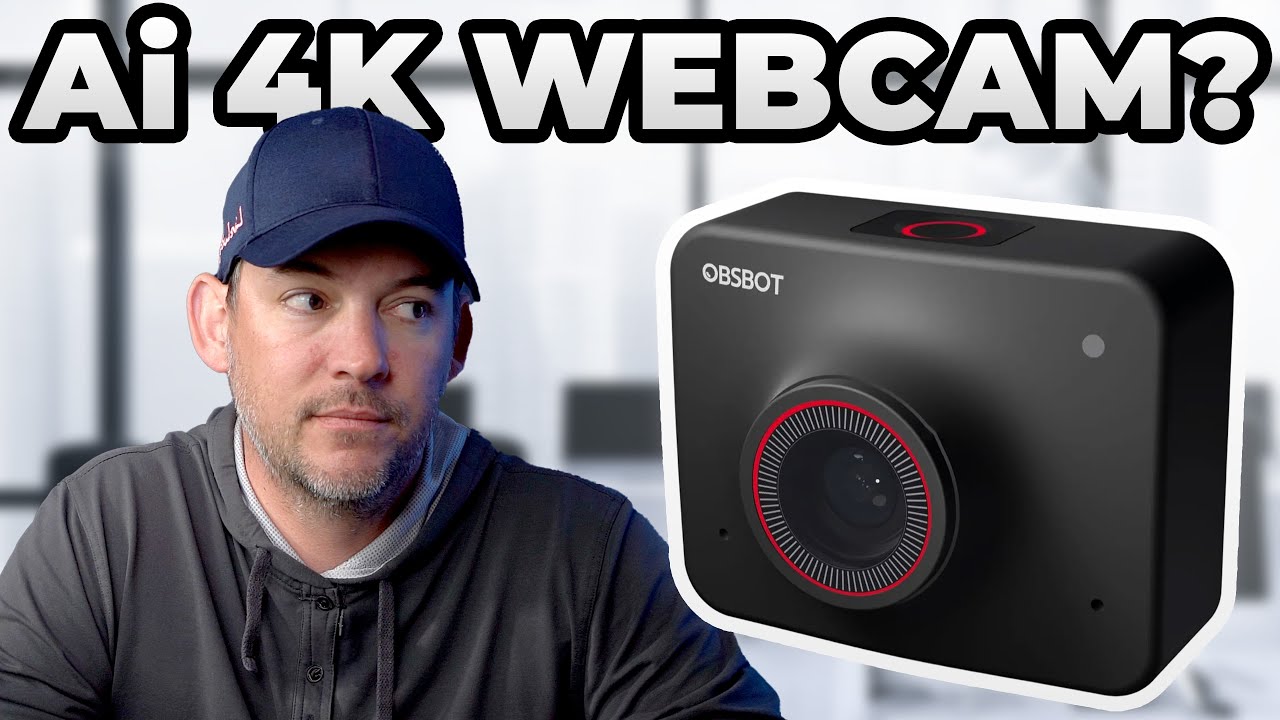
With more and more meetings and streaming happening online, it’s increasingly important to have a good webcam beyond the one built into your laptop. The OBSBOT Meet 4K is a high-quality webcam that plugs straight into your computer.
| Spec | OBSBOT Meet 4K |
|---|---|
| Size / weight | A little smaller than a GoPro, 2.54 oz |
| Video | 4K at 30 fps, 1080p at 60 fps, plus lower resolutions |
| Zoom | 4× digital |
| Lens | f/2.2, field of view 86°, 78° or 65°, HDR |
| Audio | Dual omnidirectional microphones |
| Connection | USB-C |
| Mounting | Magnetic laptop bracket, ¼-20 thread |
What I liked
Low light. It uses a high-quality Sony sensor that does very well in low light. I don’t like a lot of overhead light in my office, so I’m usually in fairly dim light on calls. In my video I tested it with no lights on except my laptop and monitor screens.
4K you can crop into, with AI framing. The 4K sensor gives you resolution to spare when the camera punches in, which is where the AI chip comes in. It’s on the camera itself, so your computer doesn’t do the processing. There are three framing modes, and the camera follows you around the room:
 From the shopFriction Is The Enemy$18.45Shop →
- Group: zooms in on you and reframes to fit someone else who joins.
- Close-up: roughly shoulders and up.
- Upper body: waist and up, following you as you move.
That’s great for presentations, or for keeping the camera close on you so less of the background shows. Because it starts from 4K, you don’t lose the quality you would cropping 1080p. Zoom (it’s certified) and Teams still compress the picture, especially on big calls, but you’re starting from the best possible image.
A quick-settings button. Press the button on top once for auto-framing, twice for the virtual background, three times for sleep. No need to open the app.
Focus and backgrounds on the camera. You can switch between face focus, which keeps your face sharp whatever else is happening in the room, and regular autofocus. Background blur, a green screen effect or your own uploaded image are all processed on the camera. It does a pretty good job, and better lighting helps it catch the edges of your face and shoulders.
It travels well. I travel a lot for work and take calls from hotels, so a small camera that packs into my briefcase or backpack is great. The magnetic mount drops onto the top of your laptop, and you can set the camera in portrait or landscape just by how you place it. The magnets are strong, so it doesn’t slip. It’s the first camera I’ve seen set up that way.
Build quality. It feels like an action camera, and the included lens cover protects the lens in a bag and doubles as a privacy cover.
What could be better
- Price. When I made my video it was $200 on OBSBOT’s site and $150 on Amazon. Not bad, but if you don’t stream or take a lot of calls, you may not get your money’s worth.
- 4K is 30 fps only. 1080p60 is noticeably smoother. That matters more for streamers than for calls, which are compressed anyway. If you want 4K60, this isn’t it.
- It gets warm. With all the processing on the camera, it heats up under long use. OBSBOT even notes it at checkout.
My verdict
I really like this little camera. The low-light quality is what sells it for me, since I don’t want to turn on a lot of lights for calls, and I like that the AI reframing happens in the camera. If you stream, you’ll love the 4K and the subject tracking. Getting a bit warm and costing $150 to $200 isn’t a big deal in real use.