
Some links below are affiliate links. If you buy through one, this site earns a commission at no extra cost to you. It never changes a verdict — here is how that works.
By Robb Sutton • Updated November 14, 2026
Between sales work, running websites, and creating content, I have plenty of reasons to spend less time at a keyboard. Emails, messages, article notes, and AI prompts all compete for the same hours. A tool that helps turn those thoughts into useful writing deserves a look.
The question is how much work remains after you stop talking.
Typeless is an AI dictation app designed to turn spoken thoughts into edited text inside the apps you already use. Its appeal is the cleanup: removing unnecessary filler, handling corrections, and giving a wandering thought some structure. The tradeoffs are an internet requirement, cloud processing, and a substantial difference between monthly and annual pricing.
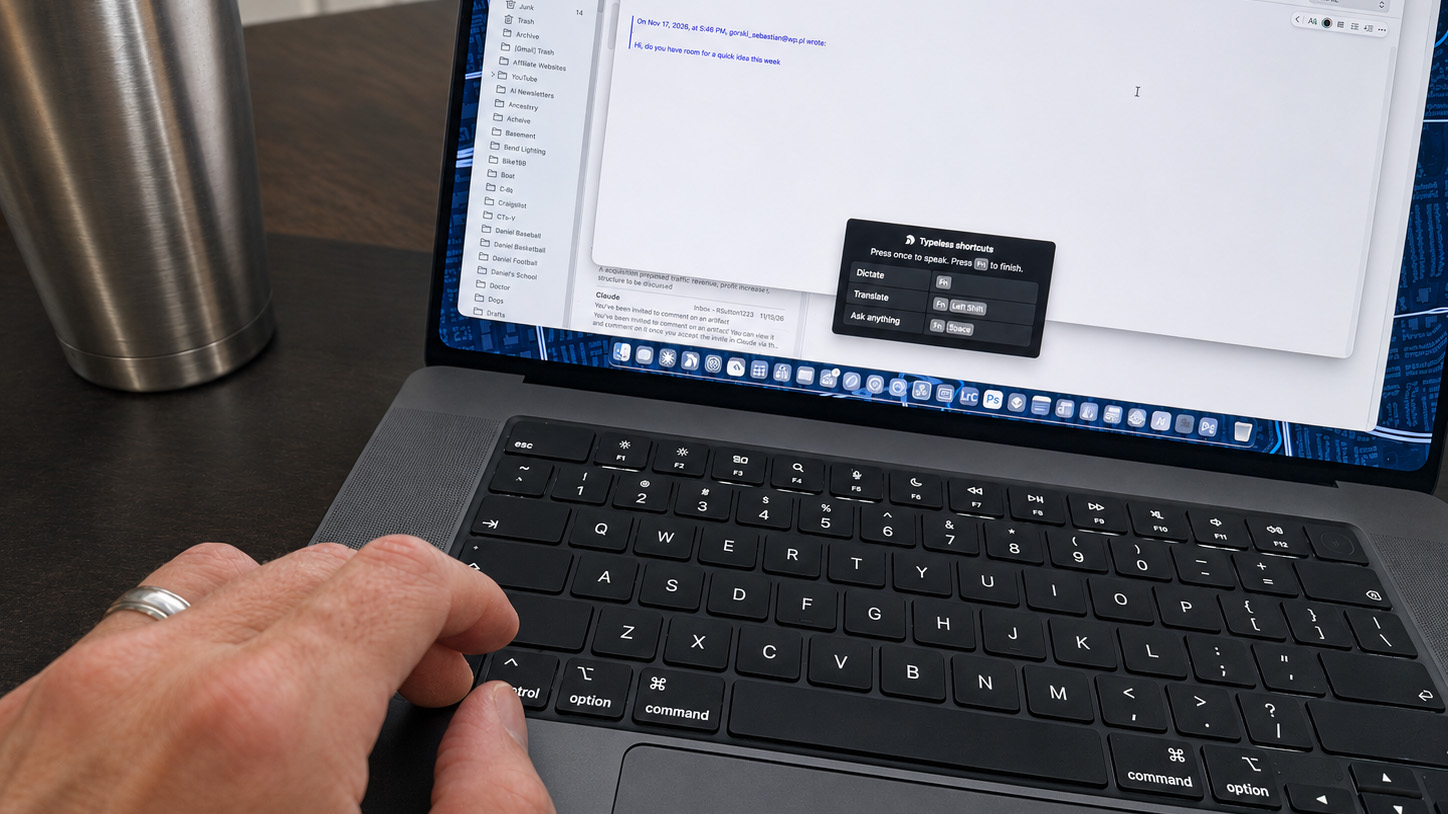
I’ve used Typeless Pro for the past month on my MacBook Pro and iPhone, mostly for emails and for prompts to Claude and other AI tools. This review combines that daily use with Typeless’s published documentation and current competitor pricing.
Gear Mentioned in This Post
- MacBook ProView on Amazon
Typeless review: the quick verdict
Typeless is worth trying if you write substantial emails, messages, or AI prompts and want help turning natural speech into a usable draft. Start free and judge the amount of editing left afterward. An annual subscription deserves consideration once dictation becomes a daily habit. A paid plan is harder to justify when most of your typing consists of short replies or precise text edits.
I’m keeping it, and I’m staying on Pro. I use it every day for email and AI prompts. I wouldn’t choose it for work that must stay entirely on the device, or for exact quotations without checking them.
| Your priority | My assessment |
|---|---|
| Getting a long thought into a draft | The reason I kept Typeless |
| Writing detailed AI prompts | One of my two daily uses |
| Reducing repetitive keyboard work | Worth testing against your existing routine |
| Working without internet | Choose an offline alternative |
| Preserving exact quotations | Check every word; automatic rewriting is a complication |
| Paying only for occasional use | Stay free where possible; compare monthly alternatives |
| Using it for company information | Review your organization’s approved tools and data rules |
Try Typeless with the free plan.
What is Typeless, and how does it work?
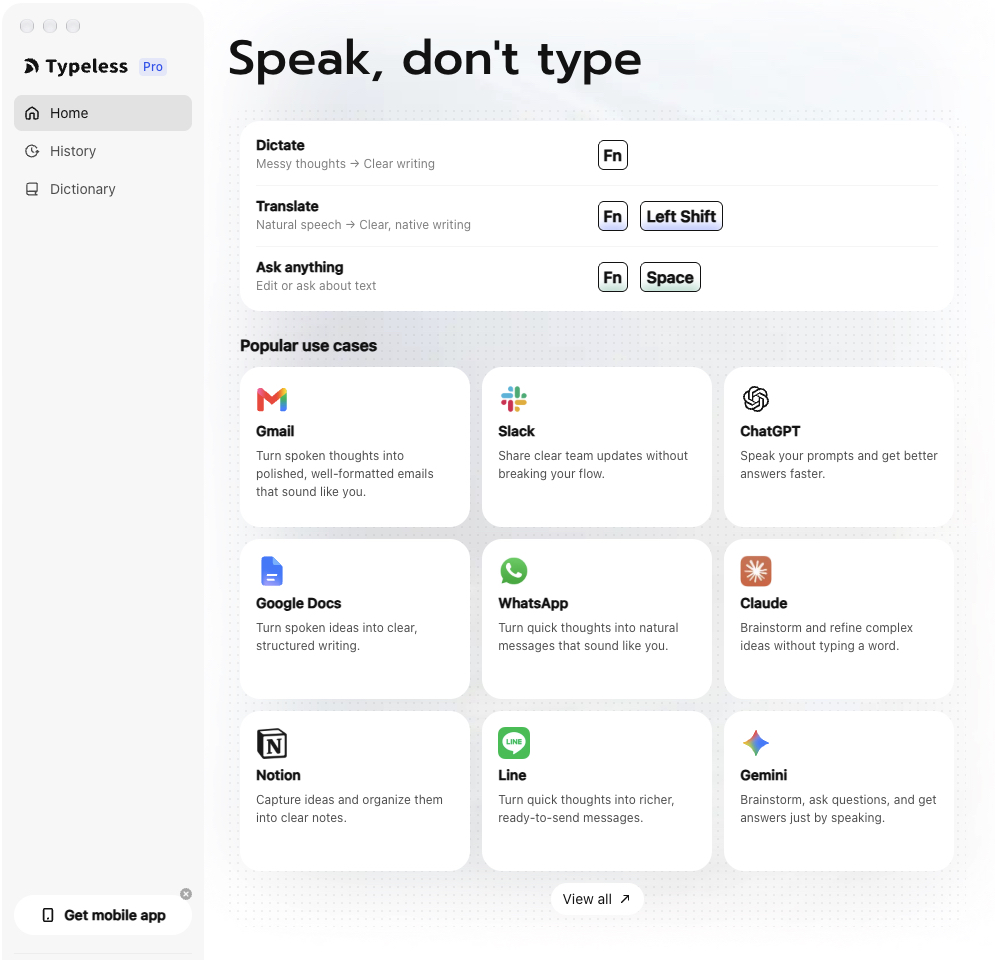
Typeless combines speech recognition with AI editing. On desktop, you activate a shortcut, speak, and have the result inserted into the text field you are using. Its documentation describes cleanup, formatting, and rewriting rather than simply preserving every spoken word. See the official setup guide.
That distinction matters because people rarely speak in finished paragraphs. We repeat a phrase, change a date, or add the most important point at the end. A useful dictation assistant needs to handle those habits without changing the substance.
Consider this illustrative instruction:
Send the updated schedule Thursday. Actually, Friday morning, after we confirm the quantity. Ask whether they need the drawings before then.
The useful outcome is a clear message that preserves Friday morning, the quantity dependency, and the question about drawings. Removing a hesitation is easy to appreciate. Accidentally dropping the dependency would make the polished message worse.
This is how I judge Typeless: does its editing reduce my work while preserving what I meant? In a month, the one miss I caught was a day of the week. I said Monday and it wrote Wednesday. I think I mumbled it. The fix took seconds and the rest of the message was right, but it’s why I read dates before I send.
Supported platforms and setup
Typeless lists macOS, Windows, Linux, iOS, and Android. Linux also has its own official release notes. Platform availability does not mean every feature has identical controls: its quickstart guide separates desktop Ask Anything from mobile Speak to Edit.
On a Mac, setup includes signing in, granting microphone and Accessibility permissions, selecting an input device, and checking your shortcuts. Accessibility access allows the app to insert text into the active field. Follow the platform-specific setup instructions rather than assuming a desktop demonstration maps directly to a phone.
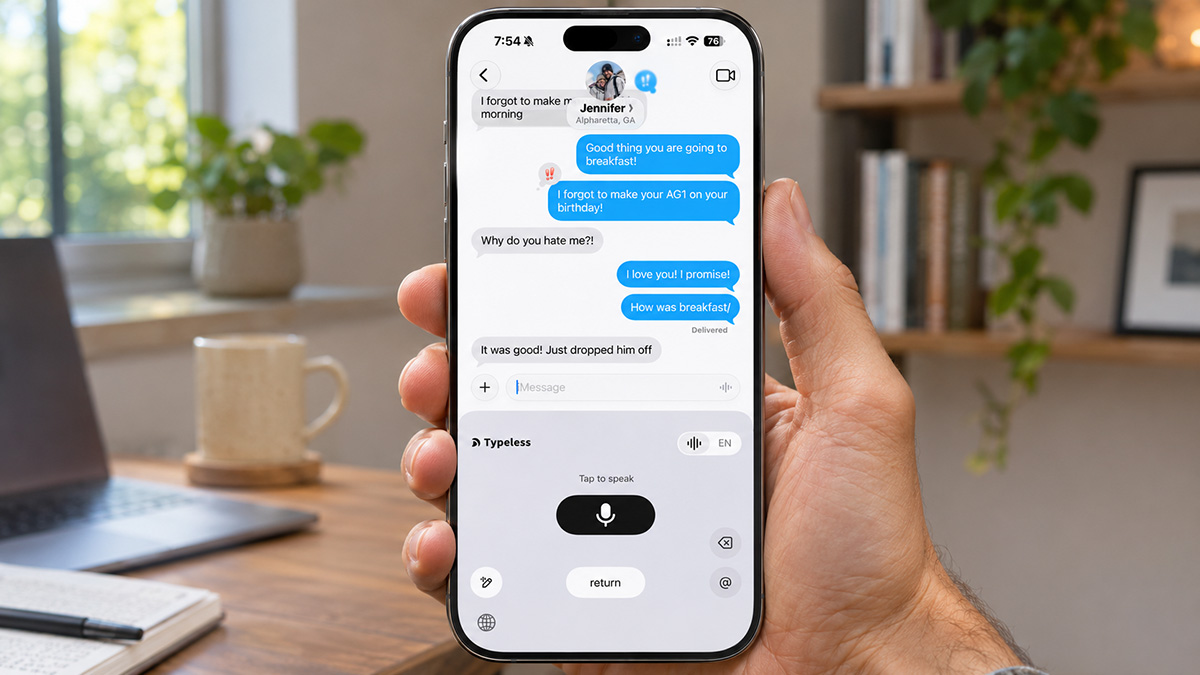
On the iPhone, Typeless is a keyboard, so you have to switch to it before you dictate. That’s the clunkiest part of the product for me. On the MacBook it’s a shortcut, and it’s effortless.
My practical advice is to start in an empty note. Establish that the microphone works, that the shortcut feels comfortable, and that text lands where expected before bringing it into your normal email routine.

The Typeless features that matter most
AI cleanup and formatting
Typeless advertises removal of filler and repetition, handling of self-corrections, and organization of spoken material. Its product overview also describes tone adaptation and personalization.
The value of those features depends on your writing habits. If you already compose concise sentences in your head, basic dictation may cover much of your need. If you work through an idea while speaking, cleanup becomes more interesting.
For content creation, begin with rough observations rather than a complete article. Talk through what stood out about a product, who it might suit, and which limitation deserves attention. Then review the structure and add the evidence. Voice input can reduce the effort of capturing observations, but it cannot supply experiences you have not had.
Voice editing with Ask Anything
Ask Anything lets desktop users issue requests involving selected text, including rewriting, summarizing, and asking questions. A practical use is shortening a draft without moving it into a separate chat window.
Specific instructions should make the result easier to evaluate. “Make this better” leaves almost everything open. “Shorten this to three sentences, preserve the dates, and keep the request for approval” gives you a clear checklist.
There is also a difference between correcting your words and asking the system to generate an answer. If you ask a factual question, check the answer as you would any AI response. A voice interface does not make a generated claim more reliable.
 From the shopPermanently in BETA$18.45Shop →
Translation and multilingual writing
Typeless advertises support for more than 100 languages and translation from spoken input into another language. These are related capabilities, but support for a language is not a guarantee of equal quality across accents, specialized vocabulary, and language pairs. The quickstart documentation links to the translation workflow.
I haven’t relied on translation in my own use, so treat this section as a guide to testing it. For international communication, evaluate it with ordinary messages first. A meeting reminder is a more sensible starting point than a technical specification. Ask a fluent colleague to assess meaning and tone if you cannot judge the output yourself.
Pay particular attention to qualifications such as “subject to approval,” “estimated,” and “no later than.” Smooth language is useful only if the business meaning survives.
Personal dictionary, tone, and quiet speech
Typeless provides a personal dictionary and advertises adaptation to your writing style and the destination app. Its plans also list Whisper mode. The dictionary is relevant for names, acronyms, and product terminology; quiet speech support is something to evaluate with your own microphone and environment.
I haven’t added a single term in a month. It has handled my everyday vocabulary without help. I still check part numbers and unfamiliar names. If you do add terms, treat that as assistance, not a promise that every future recognition will be correct.
Tone deserves the same scrutiny. An email can be professional without an unnecessary greeting or inflated language. The important question is whether the output sounds like something you would actually send.
Three everyday workflows where Typeless could earn its place
1. Drafting sales emails and follow-ups
Email is the first of my two daily uses. A follow-up often requires several pieces of information: what was discussed, what remains open, who owns the next step, and when that step is due. Speaking the complete thought is appealing when typing interrupts your train of thought.
An illustrative prompt might be:
Thank them for reviewing the samples. Ask whether engineering has completed the dimensional checks. We can discuss the production schedule once that review is finished. Keep the message direct and under 150 words.
Before sending, check the recipient, the requested action, and any implied commitment. “We can discuss the schedule” should not become “We will begin production.” That is the kind of difference that matters more than elegant phrasing.
Use fictional details while evaluating the workflow. The test is whether the process suits your work, not whether you can feed it the most sensitive message in your inbox.
2. Dictating richer AI prompts
This is the other thing I use it for most. A useful AI prompt often needs background, constraints, examples, and a desired format. Typing all of that can feel like a separate project.
Try speaking a brief that includes the audience, purpose, required facts, excluded claims, and desired length. Then read the resulting prompt before submitting it. Check that the constraints survived the cleanup.
For a product article, those constraints could include explaining the setup, identifying the intended buyer, retaining a specific drawback, and avoiding unsupported performance claims. For a business task, they might include keeping an existing price unchanged or separating confirmed facts from assumptions.
The benefit is better input with less effort. It still depends on whether you provide useful context. Dictating a vague request more quickly does not make it a better request.
3. Capturing article notes and content ideas
For a site like RobbSutton.com, the useful starting material is often an observation: something that was awkward to install, a feature that solved a problem, or a detail that looked better in marketing than in use.
Capture those observations in short batches. Keep each batch focused on one topic, then organize the material afterward. That makes it easier to spot an altered detail or a sentence that no longer reflects the original thought.
This also protects the distinction between capturing and publishing. An organized draft still needs fact checking, product context, and editing for the reader. Typeless can help with getting the words down; the judgment remains yours.
Is Typeless actually faster than typing?
Typeless markets a four-times-faster-than-typing benefit on its website. Treat that as a company claim, not the result of an independent test in this review. Speaking speed alone does not tell you how quickly a finished message is ready.
The useful measurement is:
Total time = speaking time + processing time + proofreading and correction time.
Test a longer email, a short reply, and a detailed AI prompt. Compare each with typing a similar task. Count the corrections as well as the seconds. Avoid always typing first and dictating the same wording afterward, because the second attempt benefits from rehearsal.
| Test | What to measure |
|---|---|
| Email of roughly 100 words | Time until the message is ready to send |
| Two-sentence reply | Whether activation and waiting outweigh the typing saved |
| Detailed AI prompt | Whether every instruction and exception survives |
| Names, dates, and quantities | Corrections required before use |
| Deliberate mid-sentence revision | Whether the final intended detail is retained |
| Normal office background noise | Whether your real environment changes the result |
A slight delay may be a reasonable trade for less editing on a longer message. The same delay could feel intrusive across many short replies. Your mix of tasks matters more than a single headline speed figure.
Typeless pricing: Free, Pro, and Enterprise
The following USD prices were checked against Typeless’s pricing page on November 14, 2026.
| Plan | Price | Main distinction |
|---|---|---|
| Free | $0 | Weekly usage limit and core writing tools |
| Pro, annual billing | $144 per year; $12 monthly equivalent | Unlimited words, enhanced accuracy, priority access, and cloud sync |
| Pro, monthly billing | $30 per month | Pro without the annual commitment |
| Enterprise | Custom quote | Organizational administration and additional controls |
The free tier includes translation, voice assistance, personalization, and a dictionary. Pro is not merely a larger word allowance: the company also differentiates accuracy and service priority. Enterprise lists capabilities such as SSO, provisioning, and audit logs.
How many free words does Typeless include?
Typeless’s own comparison article advertises 8,000 words per week. Its pricing page currently describes limited weekly words without stating a number. Check the allowance shown in your account before treating 8,000 as guaranteed for your signup.
That difference is worth explaining, but it should not overshadow the practical question: does the free allowance cover your normal week? A cap you never reach is not a reason to upgrade.
Should you pay monthly or annually?
At the published rates, twelve monthly payments cost $360, compared with $144 for the annual plan. The difference is $216. Five monthly payments already total $150, so annual billing costs less if you would otherwise pay monthly for at least five months.
That arithmetic does not make annual billing the right first move. If you only need a month or two, the smaller initial commitment can be sensible. If you are unsure whether you enjoy dictation, use the free tier to establish the habit first.
Check Typeless and start with the free plan.
Typeless privacy: cloud processing is different from cloud storage
Typeless requires cloud processing. Its data controls page says audio and relevant app context are processed remotely, then discarded after the result returns. It says dictation is not used for model training and identifies third-party AI partners operating under its stated retention arrangements.
History is local unless you enable optional cloud sync. With that option enabled, history text can be stored remotely. Feedback submissions have separate diagnostic and consent provisions described in the privacy policy.
These are the company’s published commitments, not findings from an independent security audit conducted for this article.
| Question | What to understand |
|---|---|
| Does dictation stay entirely on the device? | No; processing occurs in the cloud |
| Can surrounding information be involved? | Typeless describes relevant application context |
| Is history always local? | No; optional sync can store history text remotely |
| Does a retention promise mean offline operation? | No; processing location and retention are separate |
For work use, the decision should follow the information involved and your organization’s rules. Approval for one AI product does not automatically cover another app with different permissions, providers, or settings. Ask the appropriate internal owner before introducing a new cloud tool into a restricted workflow.
For personal use, make the same decision deliberately. Understand what you are submitting, review the history setting, and distinguish normal dictation from choosing to send feedback.
Important Typeless limitations
It needs an internet connection
Typeless’s documentation says its features require internet access. If you regularly work on flights or in locations with unreliable connectivity, that is a practical limitation. Downloading the desktop app does not make its processing local.
I haven’t hit this wall in a month, because I only use it where the connection is good. I also wouldn’t dictate on a plane even with Wi-Fi. It’s the same as taking a phone call when calls aren’t allowed.
Edited text still needs proofreading
Read important names, quantities, dates, and negative statements carefully. “We cannot approve this” is a useful evaluation phrase because losing one word reverses the message. The same applies to quotations and technical instructions. My one miss in a month, Wednesday for Monday, falls squarely in this category.
Speaking is not always convenient
An open office, a quiet shared room, or a public setting can make voice input awkward. Even accurate quiet-speech recognition would not make the content of a spoken message private from nearby people. Some tasks will remain easier to type.
Dictation is not the same buying decision as meeting capture
The Typeless pages reviewed focus on writing and voice assistance rather than a dedicated meeting-notetaker product. If you need participant identification, meeting recordings, and a searchable meeting archive, evaluate those requirements separately instead of assuming a dictation subscription covers them.
Subscription value depends on actual use
The published paid plans are subscriptions. There is no lifetime option shown on the pricing page reviewed. A tool that saves time every working day can justify recurring payment; one you forget to activate cannot.
Typeless vs. Wispr Flow, Superwhisper, Aqua Voice, and other alternatives
This is a comparison of published plans and capabilities, not a controlled accuracy ranking. Prices are USD web list prices checked for this article; store purchases and regional offers can differ.
| App | Monthly paid option | Annual paid option | Free access | Main reason to compare |
|---|---|---|---|---|
| Typeless Pro | $30 | $144 | Weekly cap; verify in app | Cleanup, translation, voice assistance |
| Wispr Flow Pro | $15 | $144 | Limited weekly dictation | Similar writing workflow and meeting features |
| Superwhisper Pro | $8.49 | $84.99 | Free tier; limited Pro trial | Local models and a $249.99 lifetime option |
| Aqua Voice Pro | $12 | $120 | 2,000 introductory words | Technical prompting and configurable writing |
| Willow Pro | $15 | $144 | Unlimited Frontier Mini model | Free volume with a lighter model |
| Handy | Free | Free | Open source | Local desktop transcription |
Sources: Wispr plans, Superwhisper pricing information, Aqua pricing, Willow pricing, and Handy.
Typeless vs. Wispr Flow
Wispr Flow is a useful direct comparison because its Pro annual price matches Typeless while its monthly price is lower. Its current desktop free policy distinguishes a 2,000-word allowance from a 5,000-word hard cap, with slower service after the allowance. Mobile limits are account-dependent and pooled across mobile devices.
Wispr also offers meeting functionality, although access varies by plan. Its security documentation says model improvement is enabled by default on Free and Pro and can be disabled. Training permission and cloud storage are separate controls.
For an individual buyer, compare the two using the same types of email and prompt. Choose based on corrections, comfort, and cost instead of assuming similar marketing means identical results.
Typeless vs. Superwhisper
Superwhisper offers both local and cloud models. Its offline option is the key distinction for someone who needs disconnected use. Selecting a cloud model changes that data flow, so “Superwhisper is local” is incomplete without checking the configuration.
The lifetime option also deserves attention if recurring subscriptions are a concern. It is a software license subject to the vendor’s terms, not ownership of the software or an unconditional promise about every future service.
Evaluate local performance on the computer you actually use. A theoretically ideal privacy setup is less useful if you dislike the result or your hardware struggles with the selected model.
Typeless vs. Aqua Voice
Aqua’s current Pro price is lower than Typeless on both billing schedules. Its free starting allowance is 2,000 words, not a recurring weekly promise. Aqua also sells higher tiers, so match the specific features you need before comparing only the entry paid prices.
Its site emphasizes technical work and AI prompting. That makes it a relevant comparison for people dictating detailed instructions into development or AI tools. It does not establish that Aqua wins every technical vocabulary test; use your own terminology to decide.
Willow, Handy, and built-in dictation
Willow’s published free plan offers unlimited use of its lighter Frontier Mini model, with limitations elsewhere. That is why I avoid calling Typeless the universal “best free dictation app.” Word volume, output quality, and editing features are different parts of the decision.
Handy focuses on local transcription on macOS, Windows, and Linux. Its open-source approach is appealing if your main goal is converting speech into text without a cloud subscription.
Also try what you already have. Apple Dictation includes punctuation and, on supported configurations, additional on-device improvements. Windows voice typing uses online recognition and includes punctuation features. Microsoft’s separate Voice Access supports offline voice control and text entry.
Apple Dictation is free and it does add punctuation. In my use it’s horrible next to Typeless, and that gap is the reason I pay.
How to evaluate Typeless before upgrading
Use a normal working week and record the kinds of tasks you actually complete. A useful evaluation does not require a complicated spreadsheet.
- Choose three repeatable tasks. Use an email, an AI prompt, and a note or message.
- Track finished output. Include correction time, not only the time spent speaking.
- Add your vocabulary. Test names and industry terms before and after adding them.
- Check meaning. Look for changed commitments, missing exceptions, and altered numbers.
- Try your real environment. Include the microphone and background noise you normally have.
- Watch usage. Decide whether the free allowance is actually limiting you.
- Review settings. Understand permissions, history, and cloud sync before expanding use.
If the app becomes something you reach for without thinking, that is a useful signal. If you repeatedly bypass it because typing is easier, another subscription will not fix that habit.
Typeless FAQ
Is Typeless free?
Yes. Typeless offers a free plan with a weekly limit. Its blog advertises 8,000 words weekly, while its pricing page leaves the number unspecified. Use the limit shown in your account when planning usage.
How much does Typeless Pro cost?
The published web price is $30 monthly or $144 annually, equivalent to $12 per month. Annual billing is an upfront commitment, not a $12 month-to-month subscription.
Does Typeless work offline?
No. Typeless relies on internet access for its cloud-based functions. If offline use is essential, evaluate a locally configured alternative before subscribing.
Does Typeless support Mac, Windows, Linux, iPhone, and Android?
Those platforms are listed by Typeless. I use it on a MacBook Pro and an iPhone. Feature controls differ between desktop and mobile, so check the guide for the device you intend to use.
Does Typeless store recordings or train on my dictation?
Typeless says ordinary dictation audio and context are discarded after processing and are not used for model training. Optional history sync and feedback submissions have separate provisions. Review the linked policy and your settings rather than interpreting that commitment as entirely local processing.
Can Typeless replace a keyboard?
It has replaced most of my typing for emails and AI prompts. Precise editing, short replies, silent environments, and offline work still favor a keyboard. Judge the portion of your work it improves rather than expecting complete replacement.
Can Typeless translate speech into another language?
Yes, translation is an advertised capability. Check important meaning with a fluent speaker when you cannot evaluate the result yourself, especially for specialized or consequential messages.
Is Typeless better than Wispr Flow or Superwhisper?
There is no universal winner established here. Compare Wispr for a similar workflow and lower monthly price; consider Superwhisper when local models or lifetime licensing matter. The best fit depends on your devices, corrections, and privacy requirements.
Is there a guaranteed 30-day Typeless Pro trial?
The pricing page reviewed does not establish a universal 30-day Pro trial. Check the signup offer presented to your account. The free plan and a temporary paid-feature trial are different things.
Final verdict: start free and measure the editing left behind
Typeless addresses a familiar problem: having something useful to say and spending too much effort getting it into a text box. For longer emails, detailed AI prompts, and rough content notes, that is a worthwhile problem to solve.
I’m keeping Typeless. The iPhone experience is clunky because you have to choose the keyboard each time. The ease of use on the laptop, and the way it turns spoken words into text I can send, more than make up for it.
My recommendation is to start with the free plan and compare finished work. Pay attention to what you need to correct, whether the writing still sounds like you, and whether you keep using it after the novelty wears off.
If it becomes part of your daily routine, compare the annual price with the value you are getting. If offline processing or strict local control is essential, choose around those requirements from the beginning.
A useful dictation app earns its place when it leaves you with less work after you stop speaking. That is the standard I hold Typeless to, and after a month it meets it.
Try Typeless and see how it fits your workflow.