Introduction: The Battle for Your Attention
In the modern digital landscape, attention is not just a resource; it is the currency of the realm. For content creators, executives, and knowledge workers, the ability to sit down and produce high-quality output without interruption is the single greatest competitive advantage available today.
This concept, popularized by Georgetown professor Cal Newport in his book Deep Work, defines “Deep Work” as professional activities performed in a state of distraction-free concentration that push your cognitive capabilities to their limit. The opposite is “Shallow Work”—non-cognitively demanding, logistical-style tasks, often performed while distracted.
The problem is that the modern software ecosystem is engineered to keep you in the shallows. Slack pings, email notifications, and the infinite scroll of social media are designed to fragment your attention. Research by Sophie Leroy at the University of Minnesota introduced the concept of “Attention Residue”: when you switch from Task A to Task B, your attention doesn’t immediately follow. A residue of your attention remains stuck thinking about the original task. If you constantly switch contexts, your brain is effectively functioning in a persistent state of cognitive handicap.
To combat this, willpower is not enough. You need a system. You need a fortress.
This guide details the “Deep Work Software Stack”—a curated selection of tools designed to externalize your discipline. We have categorized these tools into three pillars: The Fortress (Blocking Distractions), The Metronome (Time Management), and The Command Center (Project Management).
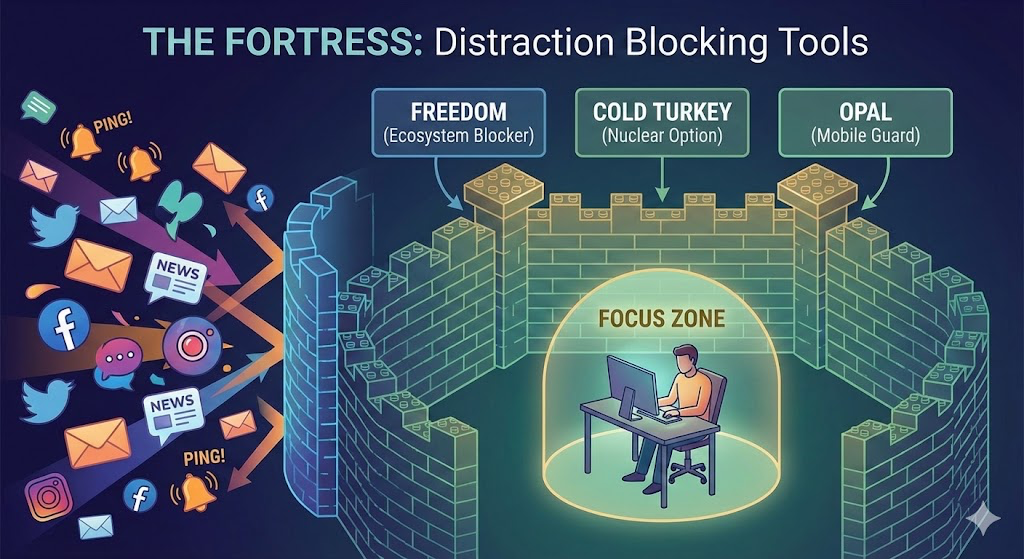
Pillar 1: The Fortress (Distraction Blocking Tools)
The first step in any Deep Work routine is defense. You cannot focus if your environment is screaming for your attention. These applications function as the walls of your fortress, physically preventing you from accessing distractions during your focused blocks.
1. Freedom (The Ecosystem Blocker)
Best For: Complete digital lockdown across multiple devices.
Freedom is widely considered the gold standard in distraction blocking because it solves the multi-device problem. Blocking Instagram on your computer is useless if you simply pick up your phone 30 seconds later. Freedom syncs your block sessions across Mac, Windows, iOS, Android, and ChromeOS simultaneously.
- Deep Dive: The core feature of Freedom is the “Blocklist.” You can create custom lists (e.g., “Social Media,” “News,” “Streaming”) or use their preset filters. When you start a session, those sites and apps essentially cease to exist on your devices. The browser will show a simple green screen indicating you are free from distraction.
- The Killer Feature: Locked Mode. In standard mode, you can quit a session if you get desperate. In Locked Mode, you cannot. You can restart your computer, delete the app, or cry—it won’t matter. The block remains active until the timer expires. This is crucial for overcoming the initial “withdrawal” pangs of boredom that strike 10 minutes into a deep work session.
- Why It Helps: It removes the option of “just one peek.” By increasing the friction of distraction to near-infinity, your brain eventually gives up the fight and settles into the work.
- Pricing:
- Monthly: ~$8.99
- Yearly: ~$3.33/month (billed annually)
- Lifetime: ~$199 (often on sale)
2. Cold Turkey (The Nuclear Option)
Best For: Desktop-heavy users who need unbreakable discipline.
If Freedom is a lock, Cold Turkey is a weld. Designed primarily for desktop (macOS and Windows), Cold Turkey is famous for being virtually impossible to circumvent. It digs deep into the system permissions to block websites, applications, and even the entire internet.
- Deep Dive: Cold Turkey allows for highly granular scheduling. You can set a work schedule (e.g., 9:00 AM to 11:30 AM, Mon-Fri) that activates automatically. The “Frozen Turkey” feature is particularly extreme—it locks you out of your computer entirely, leaving you with a blank screen until the timer finishes.
- Review: The interface is stark and utilitarian, fitting its purpose. It feels less “friendly” than Freedom but more robust. For writers who struggle with checking stats or email, the ability to block specific applications (like Outlook or Slack) while leaving Word or Notion open is invaluable.
- Why It Helps: It eliminates “Future-You” negotiation. You make the decision to work now, and the software ensures future-you respects that decision, regardless of how you feel in an hour.
- Pricing:
- Basic: Free (Limited features)
- Micromanager Pro: ~$39 (One-time purchase). The one-time fee makes it an excellent value compared to subscription models.
3. Opal (The Mobile Guard)
Best For: iOS users and reducing Screen Time “doom scrolling.”
Opal is a newer entrant that focuses heavily on the mobile experience, particularly for iPhone users. It utilizes the local Screen Time API on iOS to block apps with a level of speed and integration that older apps can’t match.
- Deep Dive: Opal creates a VPN-like shield that blocks apps from connecting to the internet. It offers a “Deep Focus” mode that, like Freedom’s Locked Mode, cannot be turned off. It gamifies the experience, giving you a “Focus Score” and allowing you to earn rewards for time spent off your phone.
- Review: The UI is beautiful, modern, and highly polished. It feels like a premium iOS experience. However, it is expensive. The strictness is effective, and the “breaks” feature (where you have to wait a few seconds before an app unlocks) adds just enough friction to stop impulsive clicking.
- Pricing:
- Pro: ~$99/year (Expensive, but frequent 50% off offers are available).
- Free Version: Basic blocking, but lacks the “Deep Focus” un-cancelable mode.
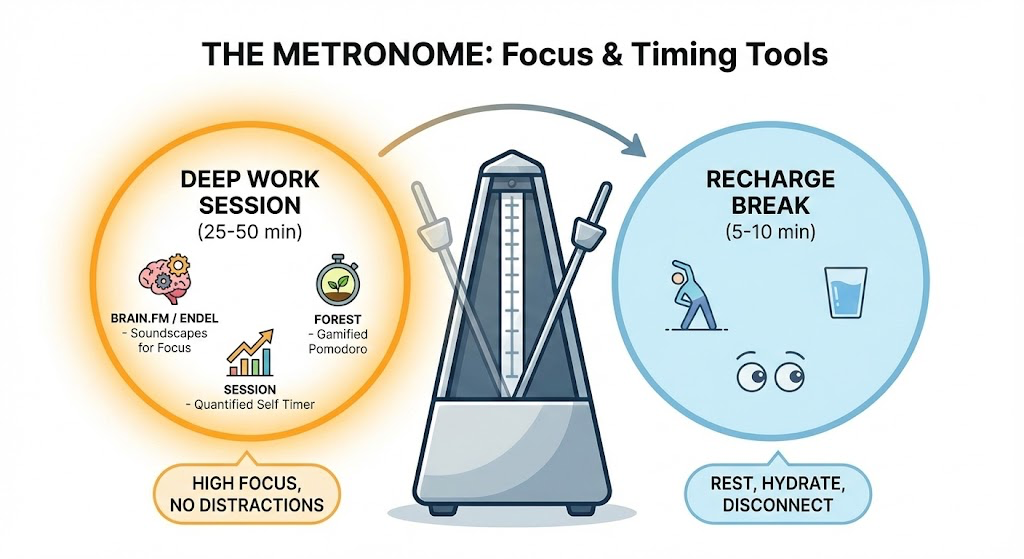
Pillar 2: The Metronome (Focus & Timing Tools)
Once you have blocked the distractions, you need a structure to govern your energy. Deep Work is draining; you cannot do it for 8 hours straight. These tools manage your energy cycles.
1. Forest (Gamified Pomodoro)
Best For: Those who need positive reinforcement and visual progress.
Forest takes the standard Pomodoro technique (25 minutes work, 5 minutes break) and adds a layer of gamification. When you start a timer, you plant a virtual seed. As the timer counts down, the seed grows into a tree. If you leave the app to check TikTok, the tree dies.
- Deep Dive: Over time, you build a “forest” that represents your days and weeks of productivity. A dense forest visually represents a week of deep work; a withered forest represents a week of distraction.
- Why It Helps: It leverages the psychological sunk cost fallacy for good. You don’t want to kill the tree you’ve spent 15 minutes growing just to read a text message. It creates a micro-consequence for distraction.
- Pricing:
- iOS/Android: ~$3.99 one-time fee.
- Chrome Extension: Free.
2. Brain.fm / Endel (Soundscapes for Focus)
Best For: masking auditory distractions and inducing flow states.
Silence isn’t always golden; sometimes, it’s deafening. Brain.fm and Endel use AI-generated soundscapes designed to influence your cognitive state.
- Deep Dive: Unlike a Spotify playlist, which can be distracting due to lyrics or beat changes, these apps create continuous, non-intrusive audio environments. Brain.fm uses “functional music” to entrain your brainwaves to a focus frequency. Endel uses circadian rhythms and weather data to generate soundscapes that match your current energy levels.
- Review: In testing, Brain.fm’s “Deep Work” channel is shockingly effective at drowning out background noise without drawing attention to itself. It acts as a cognitive trigger: when the music starts, the brain knows it is time to work.
- Pricing:
- Brain.fm: ~$6.99/mo or $49.99/year.
- Endel: ~$5.99/mo (often included in Mac App Store bundles).
3. Session (The Quantified Self Timer)
Best For: Data nerds and Mac users who want to track “Focus Analytics.”
Session is a Pomodoro timer on steroids. It not only times your work but tracks what you worked on and asks you to rate your focus after each session.
- Deep Dive: It blocks Slack notifications on Mac automatically when a timer starts. It also integrates with your calendar, so you can see exactly how much time you spent on “Writing” vs. “Admin” vs. “Email.”
- Why It Helps: Awareness is the precursor to change. Seeing that you only did 45 minutes of real work in an 8-hour day is a painful but necessary realization for improvement.
- Pricing:
- Pro: ~$4.99/mo or $39.99/year.
Pillar 3: The Command Center (Project Management & Notion)
You have the fortress and the timer, but what are you actually working on? The final piece of the stack is the system that organizes your obligations so your brain doesn’t have to hold them.
1. Notion (The Second Brain)
Best For: Centralizing all knowledge, tasks, and content calendars.
Notion is not just a note-taking app; it is a database-driven workspace. For Deep Work, Notion serves as a “Second Brain”—a place to dump every idea, task, and project so your actual brain is free to process information rather than store it.
Recommended Notion Templates for Productivity:
- Thomas Frank’s “Ultimate Brain”: This is perhaps the most comprehensive productivity template available. It combines GTD (Getting Things Done) with the PARA method (Projects, Areas, Resources, Archives). It turns Notion into a full task manager, note-taker, and project planner.
- Why use it: It saves you 100+ hours of building your own system. It links your daily tasks to your long-term goals, ensuring your “Deep Work” sessions are actually moving the needle on big projects.
- The “Bulletproof” Workspace: Great for content creators. It utilizes Kanban boards to move content from “Idea” to “Drafting” to “Published.”
- Ali Abdaal’s Resonance Calendar: A template for tracking what you read and learn. Deep Work often requires input (research); this template organizes that input so it’s retrievable later.
- Deep Dive: The danger of Notion is “shaving the yak”—spending more time tweaking your dashboard than doing the work. Stick to established templates and only modify what is broken.
- Pricing:
- Personal: Free (generous limits).
- AI Add-on: ~$8-$10/mo (Useful for summarizing messy notes).
2. Todoist (The Quick Capture)
Best For: Getting tasks out of your head instantly.
While Notion is great for project planning, it can be slow for task entry. Todoist is the best “Quick Capture” tool on the market.
- Deep Dive: Todoist uses Natural Language Processing (NLP). You can type “Review bike specs every Friday at 4pm” and it instantly schedules it.
- The Workflow: If a distracting thought pops into your head during a Deep Work session (e.g., “I need to email the sponsor”), do not do it. Do not open email. Open Todoist (shortcut:
Cmd+Shift+A), type “Email sponsor,” and hit enter. The thought is captured, anxiety is released, and you return to work without breaking flow. - Pricing:
- Basic: Free.
- Pro: ~$4/mo (Needed for reminders and filters).
The Integrated “Deep Work” Protocol
Having the apps isn’t enough; you need a protocol. Here is how you combine these tools into a daily workflow for maximum efficiency.
- The Night Before (The Setup):
- Open Notion. Review your projects. Select the one major Deep Work task for tomorrow.
- Block time on your calendar for this task (e.g., 8:00 AM – 10:00 AM).
- The Initiation (08:00 AM):
- Step 1: Activate Freedom. Select “Deep Work” blocklist (blocks Socials, Email, News). Set for 2 hours. Start “Locked Mode.”
- Step 2: Put phone in another room or activate Opal Deep Focus.
- Step 3: Put on headphones. Start Brain.fm “Focus” channel.
- Step 4: Open Session or Forest. Set timer for 50 minutes.
- The Execution:
- Work on the one task defined in Notion.
- If a random thought intrudes (“Buy dog food”),
Cmd+Shift+Ainto Todoist and keep working.
- The Break (08:50 AM):
- Timer goes off. Stand up. Walk away from the screen. Do not check email (Freedom won’t let you anyway). Hydrate.
- The Re-Entry (09:00 AM):
- Repeat the cycle.
Why This Is Smart in Modern Work Environments
The modern office (and increasingly, the home office) is an “interruption factory.” The average knowledge worker checks email or Slack every 6 minutes. In this environment, the ability to focus is not just a productivity hack; it is a career survival skill.
Using these apps is “smart” because it acknowledges a fundamental biological truth: Human willpower is a finite resource.
Every time you resist the urge to check your phone, you burn a small amount of glucose and mental energy. By 2:00 PM, your willpower battery is empty, and you default to low-value behaviors (scrolling, snacking, busywork).
By offloading the discipline to software (The Fortress), you conserve your mental energy for the actual work. You aren’t fighting yourself to stay off Twitter; the decision was made for you by the software 2 hours ago. You are free to simply work.
Expected Results
If you implement this stack, the results are often immediate and stark:
- Output Velocity Increases: You will likely complete in 2 hours what used to take you 6. Without the “switching cost” of constant interruptions, your brain operates at a higher gear.
- Anxiety Reduction: A massive source of work anxiety is the “open loops” in our heads—untracked tasks and looming deadlines. The combination of Todoist (capture) and Notion (organization) closes these loops.
- Quality of Work: Deep Work allows for complex problem solving. You will find yourself writing better code, producing more insightful articles, and developing clearer strategies because you are giving your brain the time it needs to synthesize information.
- The “Disconnect” Ability: By condensing your work into intense, efficient blocks, you earn the right to truly disconnect at the end of the day. You leave the office knowing you accomplished the big things, allowing you to be present with family or hobbies without the nagging guilt of unproductivity.
Final Thoughts
The tools listed above are not magic bullets. Downloading Cold Turkey will not write your book for you. However, they are the best armor available in the war for your attention. In a world that profits from your distraction, reclaiming your focus is the ultimate act of rebellion.
Start with one tool from each pillar—perhaps Freedom, Forest, and Todoist—and build your fortress. Your work deserves your full attention.