Introduction: The State of Smart Security in 2026
If you had asked me three years ago if a “unified smart home” was possible, I would have laughed. But it’s 2026, and the landscape has shifted fundamentally. Today, the “Ultimate Smart Home Security Ecosystem” isn’t just about buying the most expensive camera; it’s about interoperability. With the maturity of Matter 1.4 and the ubiquity of Thread 1.4networks, your locks, sensors, and cameras finally talk to one another without a PhD in computer science.
The Core Foundation: Matter 1.4 and the Unified Dashboard
For many homeowners, “Matter” and “Thread” sound like high school science projects rather than the foundation of a $5,000 security system. But in 2026, understanding these two terms is the difference between a home that “just works” and one that requires a weekly router reboot.
Here is the deep dive into the “brain” and the “nervous system” of your 2026 ecosystem.
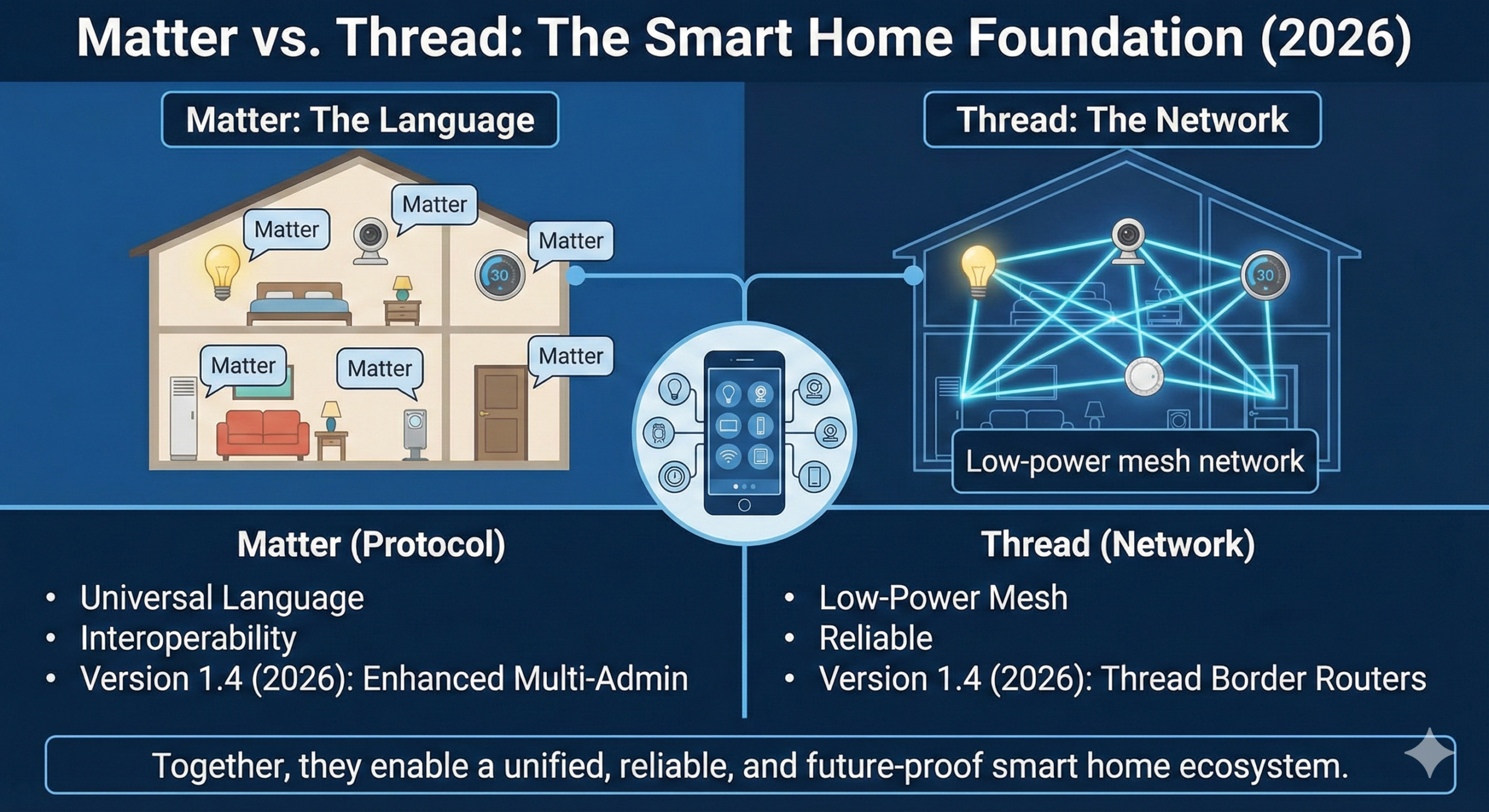
The “Brain”: Matter 1.4 (The Universal Language)
Imagine you’re at a dinner party where everyone speaks a different language—one speaks Zigbee, another Z-Wave, and the third speaks Wi-Fi. You’d need five different translators just to pass the salt. Matter is the universal language.
- What it does: It allows a Yale lock, an Eve sensor, and a Google Nest camera to speak the exact same dialect. If a device has the Matter 1.4 logo, you don’t have to ask, “Will this work with my iPhone?” The answer is simply “Yes.”
- The 2026 Game-Changer (Enhanced Multi-Admin): Before 2026, if you added a lock to Apple Home, you had to jump through hoops to also see it in your Alexa app. Matter 1.4 introduced Single-Consent Sharing. Now, when you add a device to your “Primary” dashboard, you can click one button to “Authorize All Platforms.” Your spouse on Android and you on iPhone now see the exact same real-time data with zero lag.
- Beyond Basics: Matter 1.4 now supports advanced Ambient Sensing. This means your security sensors can now report more than just “Open/Closed.” They can detect room occupancy via radar or even the energy usage of the smart plug they are attached to, allowing your “Security Dashboard” to double as an energy management station.
The “Nervous System”: Thread 1.4 (The Invisible Mesh)
If Matter is the language spoken, Thread is the road the message travels on.
- Why not just use Wi-Fi? Wi-Fi is a “Hub-and-Spoke” system. If your router is in the basement and your door sensor is in the attic, the signal has to travel all that way, eating up battery life. If the router dies, the sensor is useless.
- The Thread Advantage (Self-Healing Mesh): Thread devices talk to each other. Your smart lock talks to your light switch, which talks to your smart plug, which eventually talks to the hub. If you remove the light switch, the lock just “heals” its path and talks to the plug instead.
- Thread Border Routers (The Bridge): A Border Router (like an Apple TV 4K, HomePod, or Eero Max) is the specific device that connects your “Thread Road” to the “Wi-Fi Highway.” In 2026, the best systems use Multiple Border Routers. If your Apple TV unplugged, your Thread network doesn’t die; it instantly promotes another device to be the “Leader,” ensuring your alarm system stays armed.
Why “Local Control” is the Ultimate Security Feature
The biggest shift in 2026 is the move away from the cloud. In older systems, when you pressed “Unlock” on your phone, that signal went to a server in Virginia, then back to your house.
In a Matter-over-Thread ecosystem, the signal stays inside your walls.
- Speed: Lights turn on and doors unlock in milliseconds, not seconds.
- Reliability: If a storm knocks out your fiber optic cable, your motion sensors will still trigger your sirens and your phone will still receive alerts (as long as you’re on the local Wi-Fi).
- Privacy: Your daily “arrival and departure” patterns aren’t being sold to advertisers because the data never leaves your local hub.
Product Recommendations: Good, Better, Best
| Feature | Good: SimpliSafe / Ring | Better: Abode / Arlo | Best: Vivint / Custom PoE |
| Setup | DIY (Plug & Play) | DIY (Pro-sumer) | Professional / Hardwired |
| Interoperability | Limited (Proprietary) | High (Matter/Z-Wave) | High (Integrated) |
| Storage | Cloud Only | Cloud + Local (SD) | Local NVR / NAS |
Export to Sheets
1. The “Good” Choice: SimpliSafe (Simple & Reliable)
The Verdict: The best balance of affordability and real-world deterrence for the non-technical homeowner.
SimpliSafe has historically been the “safe” DIY choice, but in 2026, it has pivoted from being a passive alarm system to an active defense system. The cornerstone of this shift is Active Guard Outdoor Protection (AGOP).
- How it Works: When the Outdoor Camera Series 2 detects a person in a restricted zone at night, it doesn’t just send a push notification. It triggers a live feed to a SimpliSafe monitoring agent. If the person is a genuine intruder, the agent speaks through the camera’s 90dB siren: “This is SimpliSafe. You are being recorded. The police have been dispatched.” * The 2026 Tech: The Series 2 cameras now feature improved Wi-Fi range and AI-driven “human-only” detection to prevent the agent from being alerted by a stray neighborhood cat.
- The Trade-off: To get 24/7 AGOP, you’ll need the Pro Plus plan, which sits at around $79.99/month. It’s the highest monthly fee in the DIY category, but it effectively replaces the need for a physical security guard.
- Best For: Renters or homeowners who want professional-grade “talk-down” features without the complexity of hardwiring.
2. The “Better” Choice: Abode iota (The Tech-Lover’s DIY)
The Verdict: The ultimate “Switzerland” of security—it plays nice with every platform you already own.
Abode iota isn’t just a security hub; it’s a gateway to a fully automated home. In a world of competing standards, Abode remains the leader in Matter 1.4 integration, making it the only choice for users who want to see their security status on an Apple Watch, a Google Nest Hub, and a Windows PC simultaneously.
- The “All-in-One” Edge: The iota hub itself contains a 1080p camera, a motion sensor, and a 93dB siren. In an apartment or condo, this single device might be all the security you need.
- Smart Home Mastery: Unlike SimpliSafe, Abode allows you to build complex “CUE” automations. In 2026, you can program your system so that if the camera detects motion after midnight, then every smart bulb in your house turns red and your smart blinds close automatically.
- Matter & Thread: It acts as a Thread Border Router, meaning you can add low-power Matter sensors from other brands (like Aqara or Eve) directly to the Abode ecosystem without buying extra bridges.
- Best For: Pro-sumers and Apple HomeKit enthusiasts who want to avoid monthly fees (self-monitoring is free) while maintaining a high level of technical customization.
3. The “Best” Choice: Vivint / Custom PoE (The Fortress)
The Verdict: The “No-Compromise” solution for those who want the most advanced AI on the market.
If you have the budget, Vivint is the gold standard of 2026. While DIY systems rely on the cloud for “heavy lifting,” Vivint’s 2026 hardware utilizes the Ambarella CV7 Edge AI chip. This is a massive technical leap that moves all the processing power directly into the camera.
- Proactive “Smart Deter”: Most cameras record a crime; Vivint tries to stop it. Using the CV7’s 8K processing power and radar-based detection, the Gen 3 Outdoor Camera Pro can distinguish between a delivery driver and a “lurker.” If someone lingers too long, the camera’s LED ring turns red and follows them while playing a loud warning tone—all without needing a human monitoring agent to intervene.
- Facial Recognition Entry: Thanks to the CV7 chip, Vivint now offers seamless biometric entry. As you walk up to your door, the doorbell identifies your face and automatically triggers the smart lock to open. It’s “hands-free” security that feels like magic.
- The Professional Edge: You don’t lift a finger. “Smart Home Pros” come to your house, hide the wires, and map your property’s “protection zones.”
- Best For: Large properties, high-value homes, and anyone who wants a “concierge” security experience where the technology does the thinking for you.
Summary Table: Which System Fits Your Life?
| Feature | SimpliSafe | Abode iota | Vivint |
| Primary Strength | Human Talk-Down | Matter / HomeKit | Advanced Edge AI |
| Install Time | 30 Minutes | 45 Minutes | 4-6 Hours (Pro) |
| Monthly Cost | $23 – $80 | $0 – $25 | $40 – $60+ |
| Key Tech | Active Guard | Thread Mesh | Ambarella CV7 Chip |
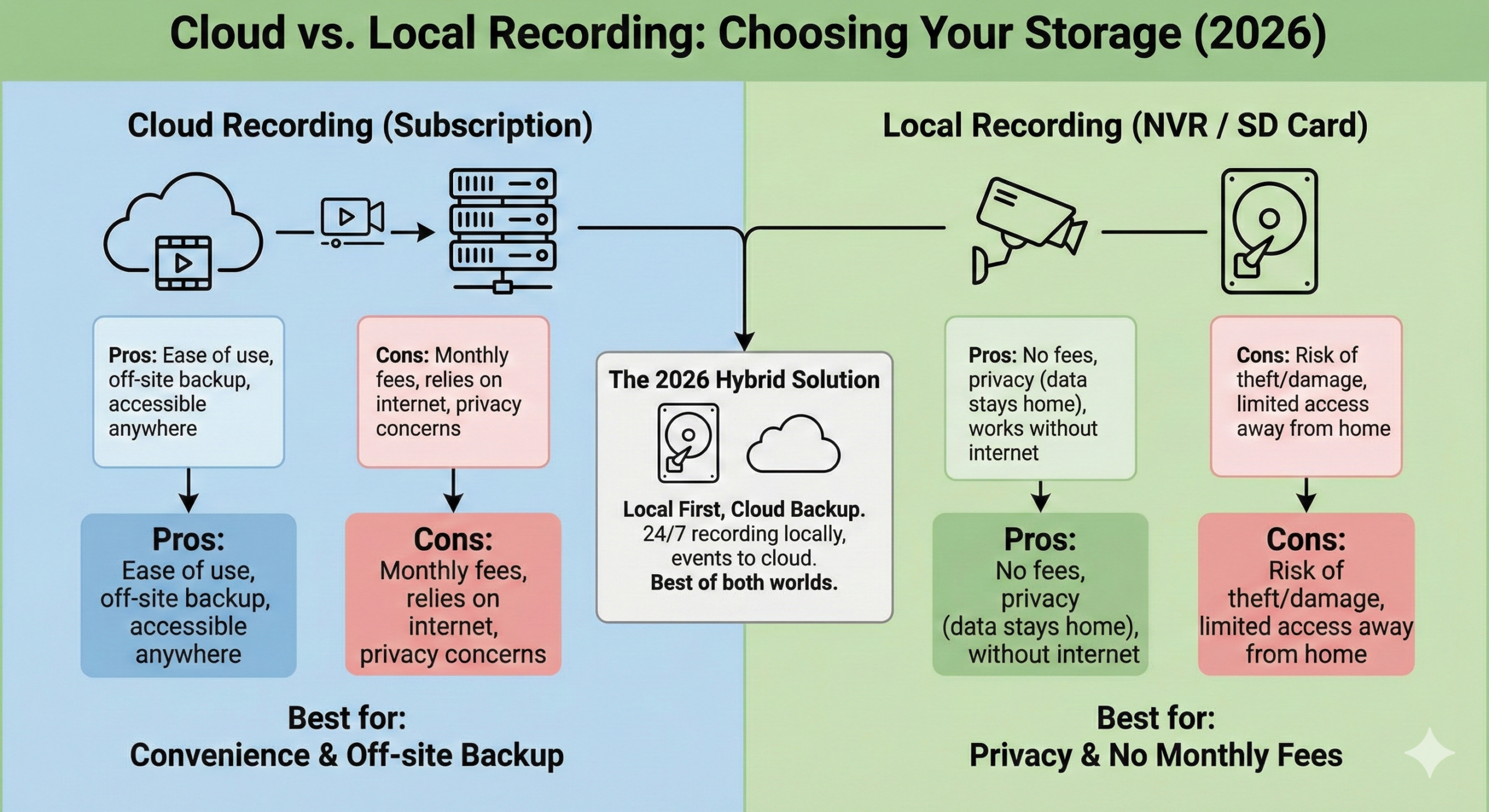
Deep Dive: Cloud vs. Local Recording
This is the most frequent question I get. Here is the 2026 breakdown:
- Cloud Recording: Best for ease of use. If a thief steals your camera, you still have the footage. However, you stop recording if the internet goes out.
- Local Recording (NVR/SD): Best for privacy. You own the data. Systems like Reolink or Ubiquiti record to a hard drive in your house.
The 2026 Hybrid: Most top-tier systems now offer “Local First, Cloud Backup.”
The debate between Cloud and Local recording has evolved. In 2026, it isn’t just about wherethe video lives; it’s about latency, AI processing power, and ownership. As an experienced reviewer, I always tell people: “If you don’t own the drive, you’re just renting your peace of mind.” But there are valid reasons to choose both. Let’s look at the deep-dive pros and cons.
Cloud Recording: The “Seamless” Path
In 2026, cloud services like Nest Aware, Ring Protect, and Arlo Secure have become more than just storage lockers; they are high-powered AI engines.
| Pros | Cons |
| Off-Site Redundancy: If a thief rips your camera off the wall or a fire destroys your home, your footage is safely stored in a data center. | The “Internet Tax”: Without a high-speed fiber or 5G connection, high-bitrate 4K footage will stutter or fail to upload. |
| Zero Hardware Maintenance: You don’t have to worry about failing hard drives or managing storage space. The cloud expands as you need it. | Privacy Risks: Even with end-to-end encryption, you are trusting a third-party corporation with the visual “private life” of your home. |
| Cross-Device Access: Pulling up a clip on your phone while 1,000 miles away is usually faster via cloud-optimized CDNs (Content Delivery Networks). | Subscription Fatigue: You’re looking at $10–$30/month indefinitely. If you stop paying, your “smart” camera becomes a paperweight. |
Tech Reviewer Tip: In 2026, look for “End-to-End Encryption” (E2EE) in cloud settings. Brands like Apple and Eufy now offer this, ensuring that even the manufacturer can’t see your clips.
Local Recording (NVR / SD Card): The “Fortress” Path
Local recording is for the homeowner who wants absolute control. This typically involves an SD card inside the camera or a Network Video Recorder (NVR)—essentially a dedicated computer in your closet with a massive hard drive.
| Pros | Cons |
| Zero Monthly Fees: You pay for the hardware once and own it forever. No $15/month subscriptions to see your own front porch. | The Theft Risk: If an intruder finds your NVR (the “brain”) and takes it, they’ve taken your evidence. You must hide the box or use a locked server cabinet. |
| Reliability: Your cameras record 24/7, even if your internet service provider (ISP) goes down during a storm. | Higher Setup Complexity: Setting up a Ubiquiti or Reolink NVR requires some basic networking knowledge (running CAT6 cables or configuring IP addresses). |
| Unlimited 4K/8K Bitrate: Cloud cameras often “compress” video to save bandwidth. Local systems record the raw, crystal-clear signal. | Drive Failure: Hard drives are mechanical and willeventually fail. You need to monitor your system’s “health” status regularly. |
The 2026 Winner: The “Hybrid” Edge Solution
Top-tier 2026 systems (like Ubiquiti UniFi or eufyCam S3 Pro) no longer force you to choose. They use Edge AI and Hybrid Storage.
- Local First: 100% of your video is recorded locally to your home hub (e.g., eufy HomeBase 3).
- Smart Cloud Backup: Only the “Event” clips (the 30 seconds where a person was detected) are encrypted and pushed to a secondary cloud location.
- The Result: You get the lightning-fast speed of local playback and the “no-fee” lifestyle, with the security of a backup if the hardware is tampered with.
Comparison: Cloud vs. Local at a Glance
| Feature | Cloud Recording | Local (NVR/SD) | Hybrid Edge (2026) |
| Initial Cost | Low | High | Medium |
| Ongoing Cost | High (Monthly) | Zero | Optional / Low |
| Privacy | Moderate | Highest | High |
| Outage Proof | No | Yes | Yes |
| Video Quality | Compressed | Raw / 4K+ | High |
Final Recommendation for New Homeowners
If you are tech-savvy and plan to stay in your home for 5+ years, go Local/NVR. The savings in subscription fees alone will pay for the hardware in less than 18 months. If you are a renter or want the simplest possible “set and forget” setup, stick with a Cloud-Hybrid like Arlo or SimpliSafe.
2026 Future-Proofing Checklist
Don’t buy a digital paperweight. Use this checklist to ensure your 2026 purchases will still work in 2030.
- [ ] Matter 1.4+ Certified: Ensure the box has the Matter logo. Version 1.4 is critical for multi-admin stability.
- [ ] Thread 1.4 Compatible: For locks and sensors, skip Wi-Fi-only models. Thread provides better battery life and mesh reliability.
- [ ] On-Device AI (Edge Processing): Avoid cameras that require the cloud just to tell a person from a cat. It’s faster and more private.
- [ ] NFC / Apple Home Key Support: Your smart lock should support “Tap to Unlock” via your phone or watch.
- [ ] USB-C Charging: If it’s a battery-powered device, don’t accept Micro-USB in 2026.
- [ ] Subscription-Free Options: Ensure the device has a “Local Only” mode so it still works if the company goes out of business or raises prices.
Frequently Asked Questions (FAQ)
Does Matter 1.4 work with my old 2022/2023 cameras?
Generally, yes—if the manufacturer released a firmware update. However, older cameras may only support basic “viewing” in Matter. To get the 2026 features like Enhanced Multi-Admin or Advanced Occupancy Sensing, you typically need 2025/2026 hardware.
What happens to my smart locks if the power goes out?
If you are using Thread-based locks, they will continue to communicate with your sensors and phone locally (via Bluetooth or Thread) as long as your “Hub” (like an Apple TV or HomePod) is on a battery backup. Always choose a lock with a physical key override or an external battery jump-start port.
Is AI facial recognition safe?
In 2026, the answer depends on where the processing happens. If the camera has a Local AI Chip, your facial data never leaves the device. Avoid “Cloud-Only” facial recognition if privacy is your top priority.
Which system is best for Windows or Mac users?
If you use a desktop most of the day, Google Home and Arlo have the best web-based dashboards. Apple Home is great on a Mac, but it requires you to be fully in the Apple ecosystem.
Final Recommendation: The 2026 Master Blueprint
- Hub: Apple TV 4K or Nest Hub Max (Acting as a Thread Border Router).
- Cameras: eufyCam S3 Pro for outdoors (No fees, Solar, HKSV).
- Lock: Lockly Affirm (Matter-over-Thread).
- Sensors: Aqara Matter Sensors (Fast, cheap, and tiny).